Architecture
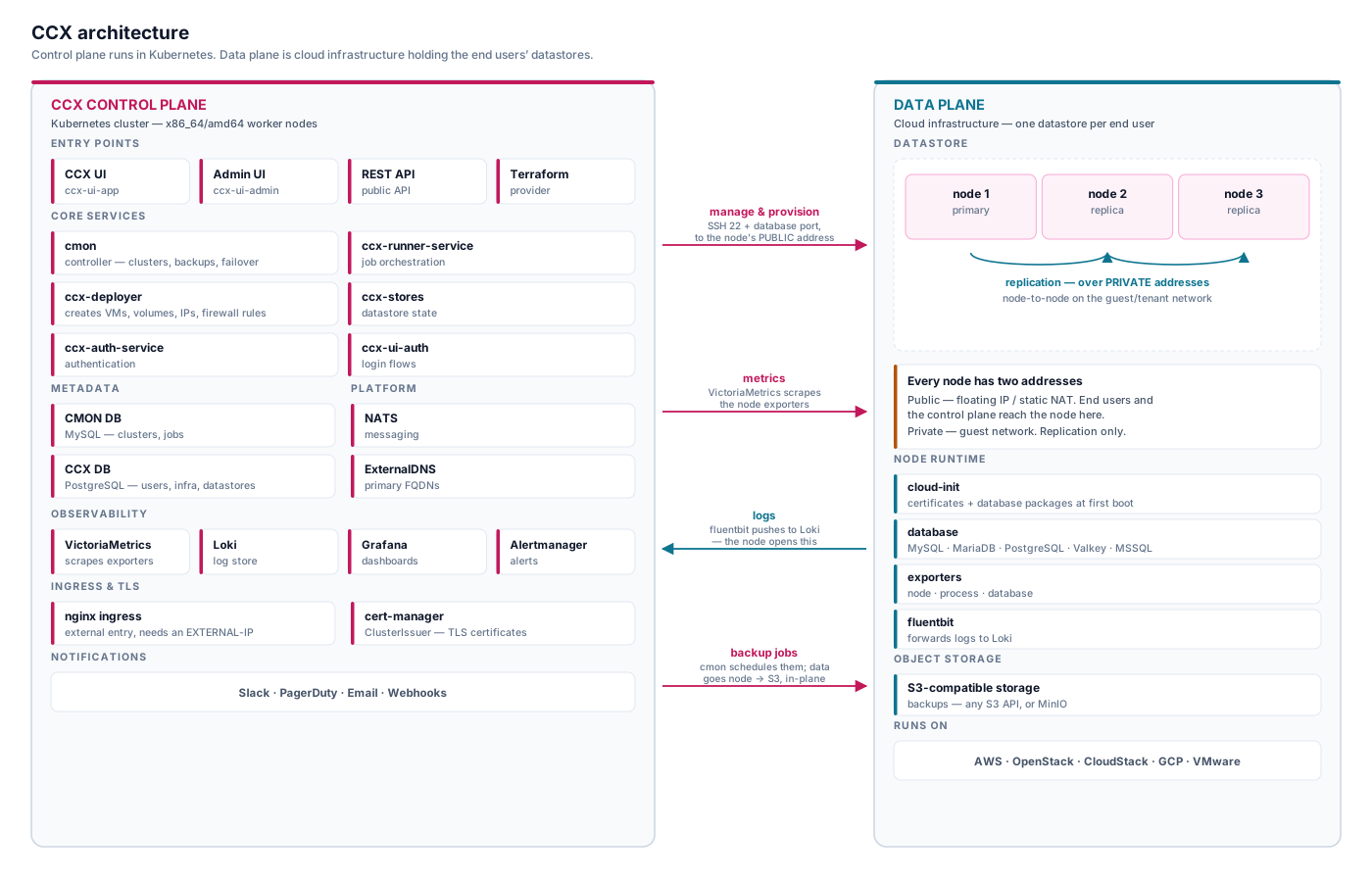
This document describes the architecture of the controlplane. The CCX controlplane runs fully in Kubernetes and is comprised of a number of services. The services are responsible for authentication, state handling, monitoring, jobs handling etc. so that the lifecycle of a datastore can be maintained; from inception to destruction. In this section we will cover the most core concepts in CCX.
Controlplane
This section describes the Controlplane, which runs in K8s.
Jobs
Actions taken on CCX is a handled as a job and is initiated by the end-user or the system automatically:
- Deployment and destruction of a datastore
- Scaling (data nodes and volumes)
- Restore of database
- Configuration management
- Database upgrades
- Automatic error handling
The jobs are managed by a service called ccx-runner-service
Deployment
Deployment of a datastore is executed as a job. Moreover, one component called the CCX deployer is responsible for infrastructure creation and destruction. Creating a datastore involves the following steps:
- create the VM
- create network and attach to the VM.
- allocate a public ip and and attach to the VM.
- create storage and attach to the VM.
- update ExternalDNS.
If any resource cannot be allocated, then the creation will fail, and it is up to the deployment job to retry. When the infrastructure has been created, then the VM boots and executes cloudinit. Cloudinit setups up SSL certificates and also installs the database software on the VM.
Controller (CMON)
Runs in a pod called cmon.
The controller is responsible for:
- creating the datastore by setting up according to the configuration, e.g ensuring that replication links are created, backup schedules are configured.
- maintains the status of the datastore.
- applying configuration changes on the datastore, such as database parameter changes issues by the end-user.
- creating backups.
- executing restore.
- scaling of nodes (add and remove nodes to the datastore).
- failover, elect a new primary if the current primary fails.
- provide details about query monitoring.
Job Runner
The ccx-runner-service is responsible for jobs handling in CCX. Some jobs in CCX are mapped to a job executed by the Controller. Thus, if the job in the Controller fails, then the ccx-runner-service handles the failed job and takes further actions, e.g, to retry the job.
Metadata repositories
CMON DB
CMON DB is responsible for storing metadata required by the Controller (CMON). E.g, all the datastores (called clusters in CMON) are stored in this database. Also, jobs that CMON executes are stored here.
CMON DB is managed by an operator in K8s, but it can be an externally managed database as well. Read more here about installing the operator.
CCX DB
CCX DB is responsible for storing metadata required by the CCX services. E.g users, infrastructure, and datastores.
CCX DB is managed by an operator in K8s, but it can be an externally managed database as well. Read more here about installing the operator.
Dependencies
External DNS
Each database node in a datastores has a FQDN. Also, there is an FQDN pointing to the primary writeable database node. This makes it easy for application developers as they only need to connect to a single endpoint; if the primary fails, then the DNS is updated to point to the new primary.
Moreover, ExternalDNS offers an interface to a number of DNS providers. If you have a DNS provider that is not present in the list of DNS providers, then you need to create a zone in a supported DNS provider, e.g CloudFlare or Route53.
Read more about ExternalDNS.
Observability
CCX uses popular tools and techniques for observability. The tools are outlined below and more information can be found in the installation guide.
VictoriaMetrics
VictoriaMetrics is used to scrape exporters. Exporters are installed on all database. See below for more information.
Loki
Loki is used to store log files forwarded from the database VMs. See below for more information.
Grafana
Grafana is used for dashboards.
Authentication, Frontends and API Access
CCX services can be consumed using the CCX UI, a REST API or a Terraform Provider.
Authentication
Authentication to CCX is handled by the services ccx-ui-auth and ccx-auth-service.
Authentication mechanism consists of:
- Username / password
- Oauth2 credentials (the CCX terraform provider uses this).
- JWT - for UI and API integration.
CCX UI
The CCX UI can be customized and white-labeled. The CCX UI runs in a POD called ccx-ui-app.
CCX Admin UI
The CCX Admin UI provides basic administration features. It runs in a pod called ccx-ui-admin.
REST API
There is Swagger documentation describing the API.
Terraform Provider
Datastores can be created and scaled using the Terraform provider.
Service reference
The controlplane runs as a set of small services. You do not need to know all of them to operate CCX, but knowing which one owns a given behaviour turns "the deploy failed" into a specific pod to read logs from.
Most services run several replicas; the counts below are not fixed.
Provisioning and state
| Service | What it does | Look here when |
|---|---|---|
cmon | The controller. Creates the datastore, configures replication, runs backups and restores, performs failover, reports status. Runs as a StatefulSet. | A datastore deploys but never becomes healthy, backups fail, failover misbehaves |
ccx-runner-service | Orchestrates jobs. Some CCX jobs map onto a cmon job; if that fails, this service decides whether to retry. | A deploy, scale or restore is stuck or silently retried |
ccx-deployer | Creates and destroys the cloud infrastructure — VMs, volumes, public IPs, firewall rules. | A deploy fails early, before any database is installed |
ccx-stores-service | The datastore and infrastructure state API. | Datastore state looks wrong in the UI or API |
ccx-stores-listener | Reacts to state change events. | State changes are not propagating |
ccx-state-worker | Background reconciliation of stored state. | Stored state drifts from reality |
APIs, authentication and frontends
| Service | What it does | Look here when |
|---|---|---|
ccx-rest-user-service | The end-user REST API. This is what the CCX UI and the Terraform provider call. | API calls fail, or the UI errors on an action |
ccx-rest-admin-service | The admin REST API, behind the admin UI. | Admin operations fail |
ccx-auth-service | Authentication — username/password, OAuth2, JWT. | Login fails or tokens are rejected |
ccx-user | User management. | User creation or lookup fails |
ccx-ui-app | The end-user portal. | The portal will not load |
ccx-ui-admin | The admin portal. | The admin portal will not load |
ccx-ui-auth | The login and registration flows. | Sign-up or sign-in pages misbehave |
Monitoring and notifications
| Service | What it does | Look here when |
|---|---|---|
ccx-monitor-service | Monitoring of datastores. | Health or status is not updating |
store-metrics-sd | Service discovery — tells VictoriaMetrics which datastore nodes to scrape. | Metrics stop appearing for new nodes |
store-internal-metrics-sd | The same, for CCX's own internal metrics. | Controlplane metrics are missing |
ccx-notify-worker | Sends notifications to Slack, PagerDuty, email and webhooks. | Alerts fire but nobody is told |
ccx-hook-service | Handles webhooks. | Webhook integrations do not trigger |
Billing
| Service | What it does | Look here when |
|---|---|---|
ccx-billing-service | Billing API. | Subscription or billing lookups fail |
ccx-billing-updater | Hourly CronJob that updates billing records. | Usage or charges look stale |
Maintenance
ccx-clean-up-k8s is a daily CronJob that removes leftover Kubernetes
resources. A handful of one-shot Jobs also run at install and upgrade time —
ccx-migrate and ccx-stores-migrate apply database schema migrations,
ccx-migrate-cloud-credentials moves credentials to their current format, and
ccx-check-certificate-authority validates the CA. Seeing these in
Completed state is normal; seeing one in Error after an upgrade is not.
Pods in your namespace that do not appear above are usually from the ccxdeps
chart — PostgreSQL (acid-ccx-*), NATS, Loki, Keycloak — or are specific to
your environment rather than part of a standard CCX install.
Dataplane
The dataplane is comprised of the cloud infrastructure. End-user resources are allocated on the dataplane. Each VM instance that is created will have:
- storage, either ephemeral or block storage. Ephemeral storage cannot be scaled later.
- a network, a public IP so that the controlplane can access resources in the dataplane. There is also a private IP for internal node to node communication. The exact instance types, volume types, networks, depends from system to system and is setup by the CCX administrator and specified in values.yaml.
Encryption
Data is encrypted:
- in-transit (replication links, end-user connections, and other endpoints are TLS encrypted).
- at-rest (LUKS is used).
Cloud-init - VM boot
Cloud-init is executed during the firstboot of a VM. Cloud-init is responsible for:
- installing certificates needed by the database node.
- installing database software packages.
Observability
A few tools are installed on the database VMs to provide observability.
Logging - LOKI and fluentbit
Database logs are forwarded to Loki, which runs in the controlplane, using fluentbit. This is configured in the observability helm chart.
Metrics
Metris are sampled using exporters which are scraped by VictoriaMetrics. The following exporters are installed:
- node_exporter
- process_exporter, used by the CMON Controller, and provides information about running processes.
- db_exporter, where db refers to the database specific type of exporter, e.g redis, mysql, postgres, etc.
S3 Storage (object storage)
An S3 compatible storage is required. If there is no existing S3 compatible storage, and Minio can be configured. The S3 storage stores backups.